📢 Announcing our research paper: Zentry achieves 26% higher accuracy than OpenAI Memory, 91% lower latency, and 90% token savings! Read the paper to learn how we're revolutionizing AI agent memory.
🎉 We’re excited to announce that Claude 4 is now available with Zentry! Check it out here.
Zentry Platform (Managed Solution)
Better, faster, fully managed, and hassle free solution.
Zentry Open Source
Self hosted, fully customizable, and open source.
Zentry Platform (Managed Solution)
Our fully managed platform provides a hassle-free way to integrate Zentry’s capabilities into your AI agents and assistants. Sign up for Zentry platform here. The Zentry SDK supports both Python and JavaScript, with full TypeScript support as well. Follow the steps below to get started with Zentry Platform:1. Install Zentry
Install package
Install package
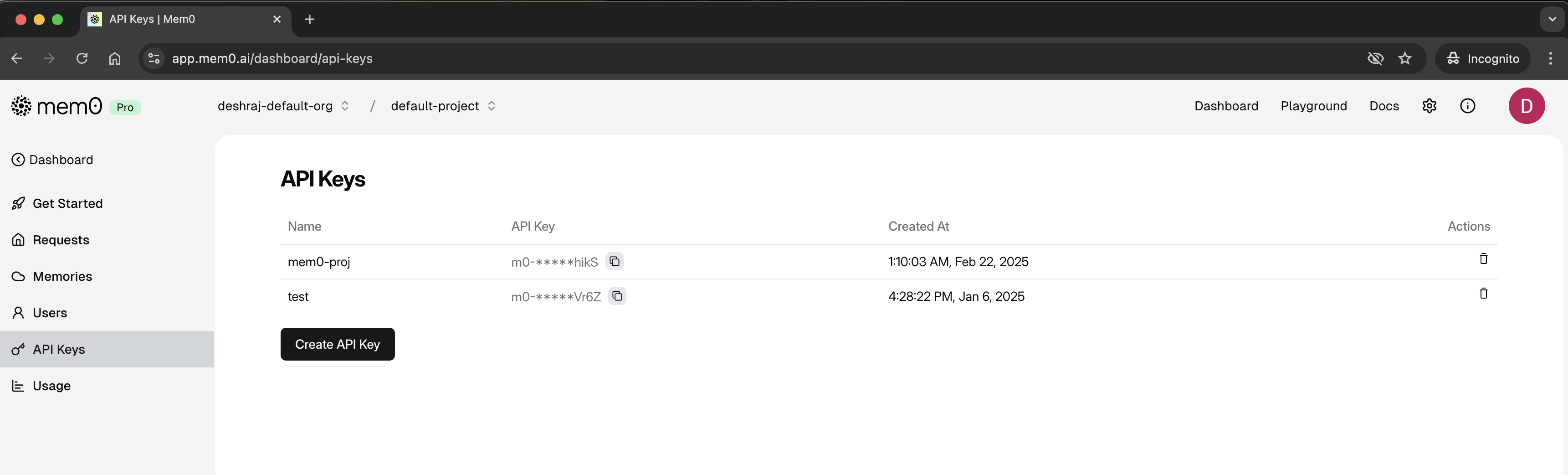
Get API Key
Get API Key
- Sign in to Zentry Platform
-
Copy your API Key from the dashboard
2. Add Memories
Instantiate client
Instantiate client
Add memories
Add memories
3. Retrieve Memories
Search for relevant memories
Search for relevant memories
Get all memories of a user
Get all memories of a user
Zentry Platform
Learn more about Zentry platform
Zentry Open Source
Our open-source version is available for those who prefer full control and customization. You can self-host Zentry on your infrastructure and integrate it with your AI agents and assistants. Checkout our GitHub repository Follow the steps below to get started with Zentry Open Source:1. Install Zentry Open Source
Install package
Install package
2. Add Memories
Instantiate client
Instantiate client
Add memories
Add memories
3. Retrieve Memories
Search for relevant memories
Search for relevant memories
Zentry OSS Python SDK
Learn more about Zentry OSS Python SDK
Zentry OSS Node.js SDK
Learn more about Zentry OSS Node.js SDK